Flexsee AI vs Octane AI: Klaviyo flows, quiz data, and predictive audiences
Flexsee vs Octane AI for Shopify—quiz-driven zero-party data versus predictive audiences, Klaviyo flows, Meta, pricing, and when to run both.
Shopify brands comparing Flexsee AI and Octane AI are usually asking one question from two directions: where does the data behind my Klaviyo and ad campaigns come from? Octane AI is built around zero-party data. A quiz asks shoppers what they want, then sends the answers and recommended products to Klaviyo and other tools. Flexsee AI is built around behavioral and order data. It syncs your store, ranks the shoppers most likely to buy a given product, and activates that audience from Campaign Flow.
This comparison helps you decide whether to stay on Octane, add Flexsee, or run both. Every Octane claim links to a public page and carries the date we checked it (see Methodology). Every Flexsee claim is checked against our docs and code. One fact up front, in the interest of fairness: Flexsee does not run quizzes or ship on-site storefront widgets, so if that is what you need, Octane is the right tool and the rest of this article is about what to add alongside it.
Executive summary
- Best for Flexsee AI when: you want to pick a product, let Flexsee rank the shoppers most likely to buy it from your orders and storefront history, and send that audience to Klaviyo, Mailchimp, Meta, or SMS from one Campaign Flow, then measure it against Shopify-attributed revenue.
- Best for Octane AI when: you want shoppers to tell you what they want through quizzes, capture consent-based email and SMS opt-ins at the same moment, and sync answers and recommended products into Klaviyo profiles and flows.
- Bottom line: the two products solve different halves of personalization. Octane collects stated preferences. Flexsee predicts and activates from behavior. They overlap on Klaviyo, so decide which flows each tool owns before you run both.
At-a-glance comparison
| Dimension | Flexsee AI | Octane AI |
|---|---|---|
| Core job | Predictive audiences and campaign activation (Campaign Flow) | Quizzes, zero-party data, and quiz-based product recommendations |
| What it learns from | Shopify orders, products, customers, and optional storefront pixel events | What shoppers answer in a quiz, plus your Shopify catalog |
| Shopper-facing UI | None: no quizzes or on-site widgets | Quiz embeds, pop-ups, and opt-in capture |
| Klaviyo | One Flexsee Campaign Send event per consented recipient, with ranked products; you build the flow in Klaviyo | Quiz answers and recommended products as profile properties, plus a quiz-completed event; flows can trigger from the event, a list, a segment, or a date |
| Meta Ads | Prepare a custom or lookalike audience and publish the advert from Campaign Flow | Meta Pixel events from the quiz (quiz started, quiz completed); you build audiences in Meta |
| Mailchimp | Mailchimp Transactional (Mandrill) send path | No native integration found in public pages (checked 2026-11-13) |
| SMS | Twilio WhatsApp and SMS path in Campaign Flow | Collects SMS opt-ins and syncs them to Klaviyo, Attentive, and Postscript |
| Reporting | Campaigns: attributed revenue, ROAS, conversion rate | Quiz analytics: conversion, recommendation performance, funnel |
| Pricing meter | Per-store plan by orders: Starter £29, Growth £99, Scale £229 | Credits, where one credit is one quiz start: from $50, $200, and $500+ a month |
| Ideal merchant | Teams that want to turn existing store data into product campaigns | Teams that want to learn preferences and grow lists with a quiz |
How Flexsee AI works (for this use case)
You connect your store under Integrations → Datasources and, optionally, enable the Flexsee AI Predictions pixel so Flexsee can see storefront behavior. From there the work happens in Campaign Flow: you pick a product, pick a predictive audience for that product, choose a destination, and activate. You do not open Models to train anything by hand.
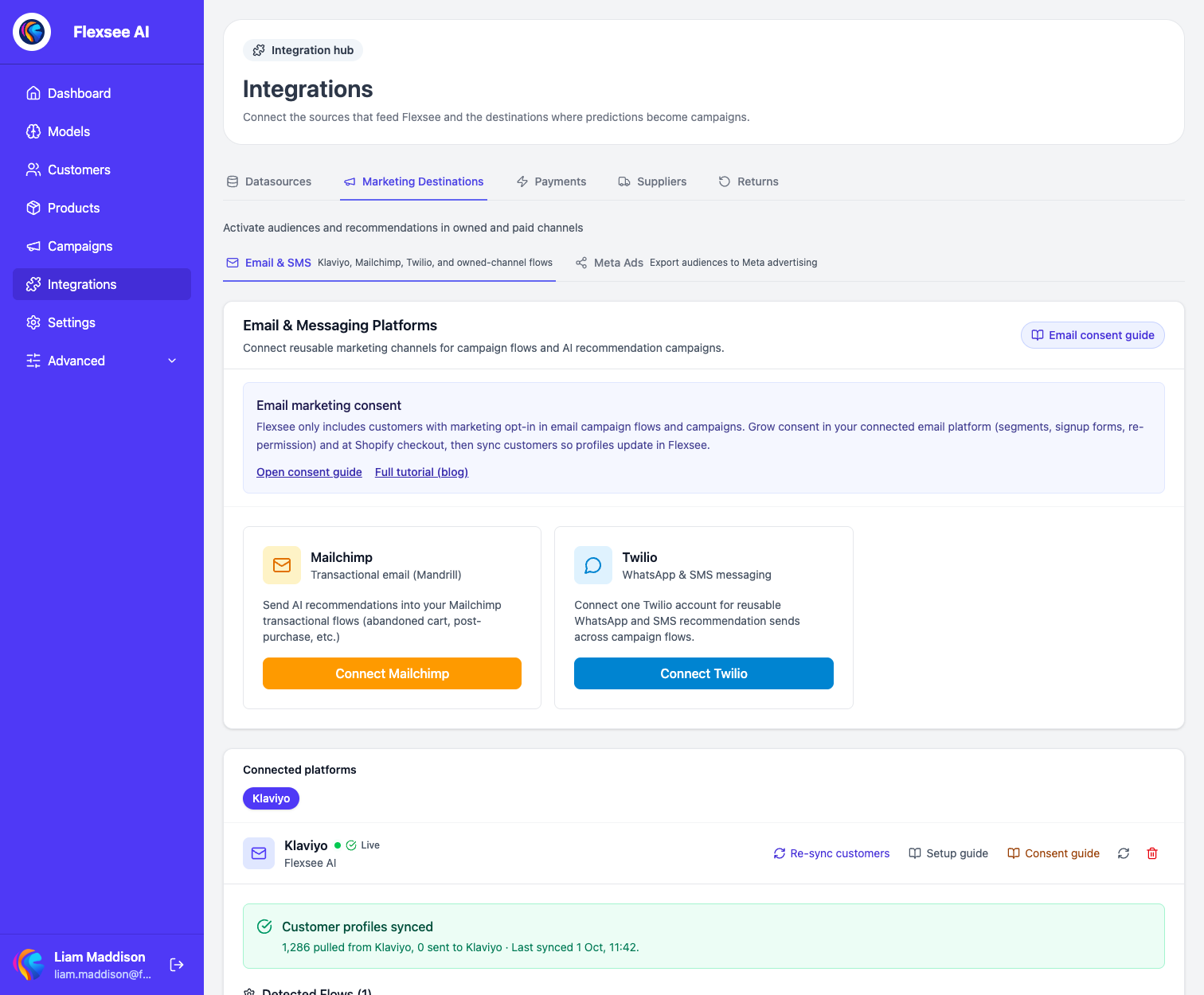
For Klaviyo, you first create a flow in Klaviyo that is triggered by the Flexsee Campaign Send metric. In Campaign Flow you select that flow, write the subject line, and choose how many products each recipient sees (3, 5, or 7). When you activate, Flexsee sends one track event per recipient to Klaviyo. Each event carries the person’s name, the subject, and an array of ranked products with title, image, URL, price, and rank. Your Klaviyo flow turns that event into an email.
Two details matter for consent. Flexsee only sends events for recipients who already have email marketing consent, and it does not subscribe anyone itself. Klaviyo then only emails profiles that are subscribed in Klaviyo. A send that Flexsee reports as sent means Klaviyo accepted the event, not that an email was delivered. The Klaviyo email campaign docs explain both.
See also: How to trigger Klaviyo flows from Flexsee Campaign Send and Shopify behavioral pixel setup.
How Octane AI works (for this use case)
Octane AI is a quiz platform for Shopify. Its Shopify App Store listing describes it as a way to “collect zero-party data, grow your email and SMS lists, and sync every answer to Klaviyo, Attentive and more.” Its newer builder, Phoenix, creates a quiz from a description or plan, using your Shopify catalog for questions, logic, and results.
The data model is centered on the shopper profile. According to Octane’s People page, every shopper who gives an email or phone number in any quiz becomes one profile, and later quizzes add answers, results, sessions, and orders to that same profile. You can filter profiles by answer and sync them to Shopify customer tags and metafields and to Klaviyo, Attentive, and Postscript as properties. Filtering across quizzes and the Shopify Customers sync are listed as Plus and Enterprise features.
Recommendations come from the quiz. Octane’s help center describes Smart Products, where an AI picks products using the shopper’s answers and a prompt you write, matching against product titles in your Shopify catalog (Smart Products guide). Manual and dynamic product blocks sit alongside it, per the same guide.
For Klaviyo, the connection guide says Octane sends email and SMS opt-ins plus quiz data: answers, recommended products, Smart Copy and Smart Properties, the results page URL, and the discount code. You choose a default list and can override it per quiz.
Feature deep dive
Shopify & catalog data
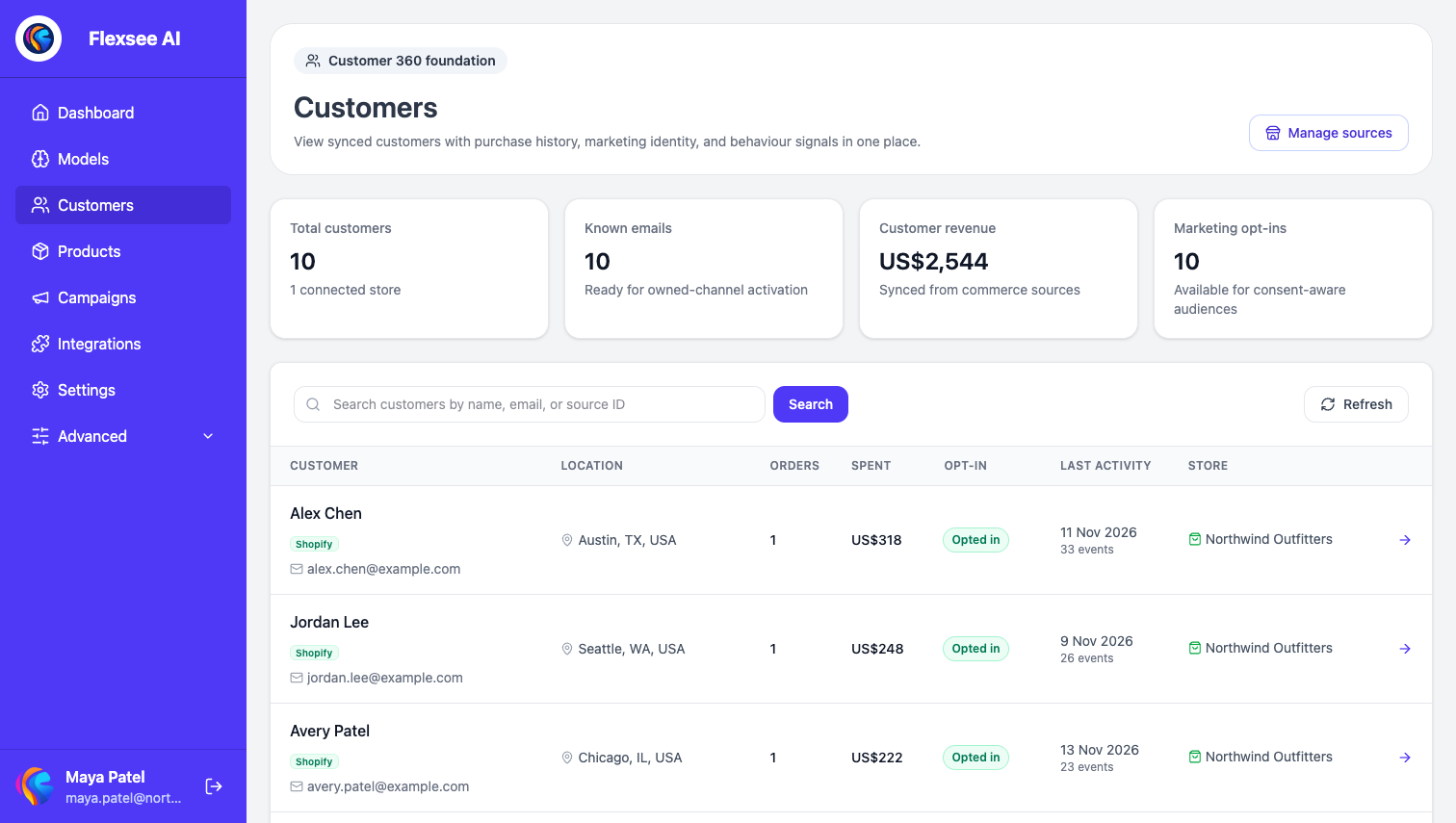
Flexsee syncs products, customers, and orders through the Flexsee Shopify app, and builds a customer profile for each synced customer. With the pixel on, storefront sessions appear on that profile as a journey. The customer journey guide shows what that looks like.
Octane asks for a different slice of Shopify. Its listing says it needs access to your customers, products, orders from the last 60 days, discounts, and web pixels. Its profiles start when a shopper shares an email or phone number in a quiz, so the profile list reflects people who engaged with a quiz.
Trade-off: Flexsee starts from everyone already in your store. Octane starts from everyone who answers a quiz. The first gives you reach across your existing customers. The second gives you richer, self-declared detail about fewer people.
Product recommendations & predictions
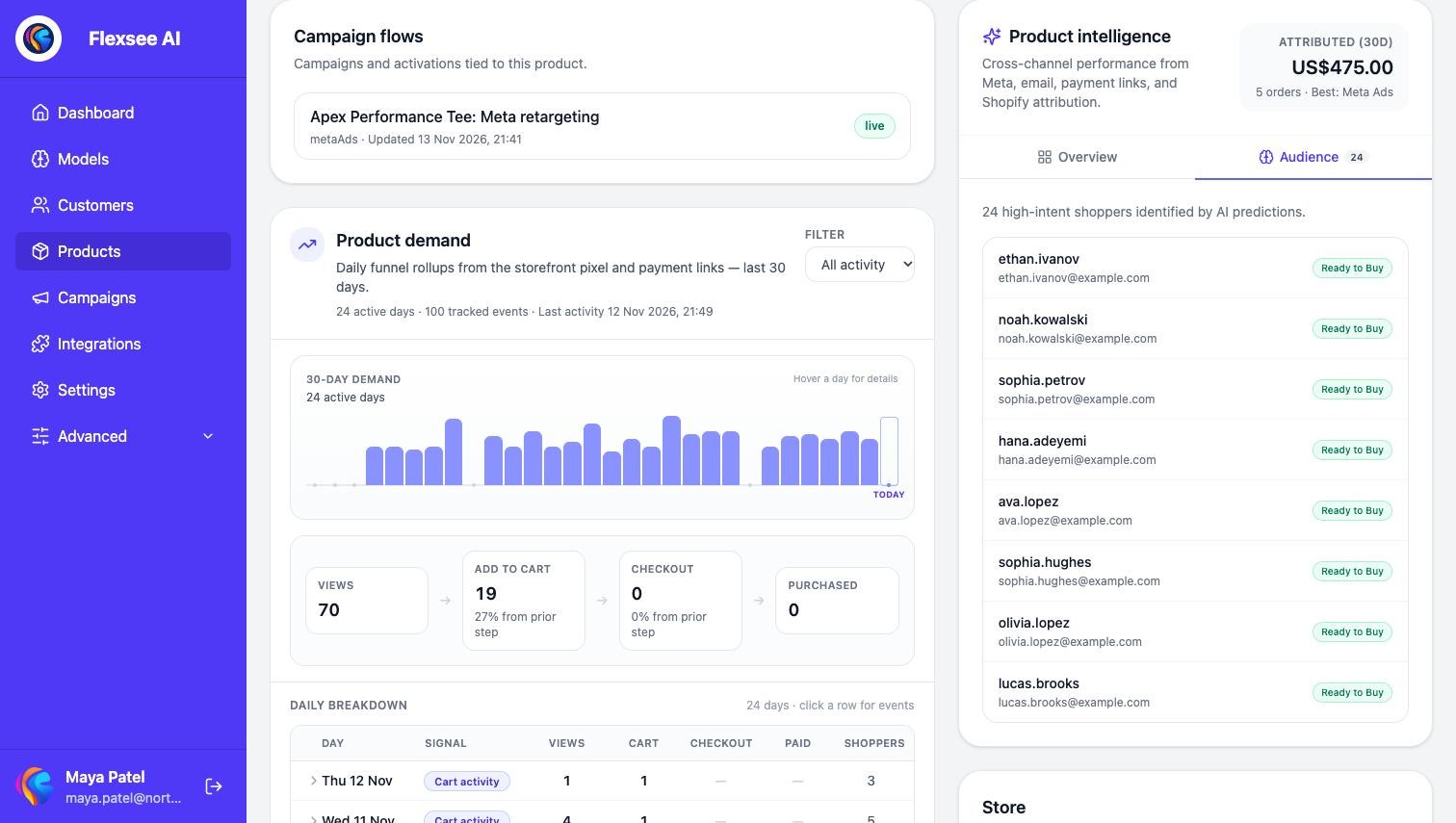
Flexsee scores shoppers for a product, and products for a shopper, from your order and behavior history. Those scores drive Campaign Flow audiences and show up on product and customer profiles. On a product’s Audience tab, every scored shopper is listed in ranked order with a readiness label, and that list is what you hand to a campaign.
Octane recommends from stated preferences. A shopper who says they have dry skin and want a night routine gets products matched to that answer. In the public pages we checked, we did not find purchase-likelihood scoring based on order history, so the two products answer different questions: what does this person say they want, and what is this person likely to buy.
Where Octane is stronger: it knows things behavior cannot reveal, such as skin type, gift recipient, size, or budget.
Where Flexsee is stronger: it can score your whole customer base, including people who never took a quiz.
Klaviyo & owned email
Flexsee gives you a defined contract. One Flexsee Campaign Send event per consented recipient, with ranked products in the payload, triggers a metric-based flow. It is campaign-shaped: you choose a product and an audience, then send.
Octane gives you more ways to trigger. Its Klaviyo flows guide lists four: the quiz-completed event (every time someone completes the quiz, which suits results emails), a list (a profile enters once), a segment (also once), and a date property for birthdays and similar flows. Quiz answers and a recommended_products property are available for segments and splits. For flows triggered by the event, the guide says profile properties cannot filter the trigger, and points you to the event property recommended_product_titles instead.
Where Octane is stronger: quiz-specific payloads, date-based flows, and list capture are built in.
Where Flexsee is stronger: it chooses the audience and the products for you, and it only sends for shoppers who are already consented.
Meta Ads & paid social
Flexsee treats Meta as a destination. In Campaign Flow you choose Retargeting, which uploads a custom audience of predicted high-intent buyers, or Prospecting, which creates a lookalike from a seed of at least 100 users. You set the budget, creative, and destination, and can publish the advert from the same flow. Publishing requires a Meta Pixel. The Meta retargeting guide walks through it.
Octane connects to Meta through the pixel. Its Meta Pixel guide explains that you enter your Pixel ID per quiz and Octane sends “quiz started” and “quiz completed” events, which you can use in Meta to build website custom audiences, for example everyone who started but did not complete, or a custom conversion. We did not find audience upload or campaign publishing in Octane’s public documentation.
Trade-off: Octane’s Meta signal is quiz engagement that you assemble into audiences yourself. Flexsee’s is a ranked audience it prepares and publishes for you.
Reporting & ROAS
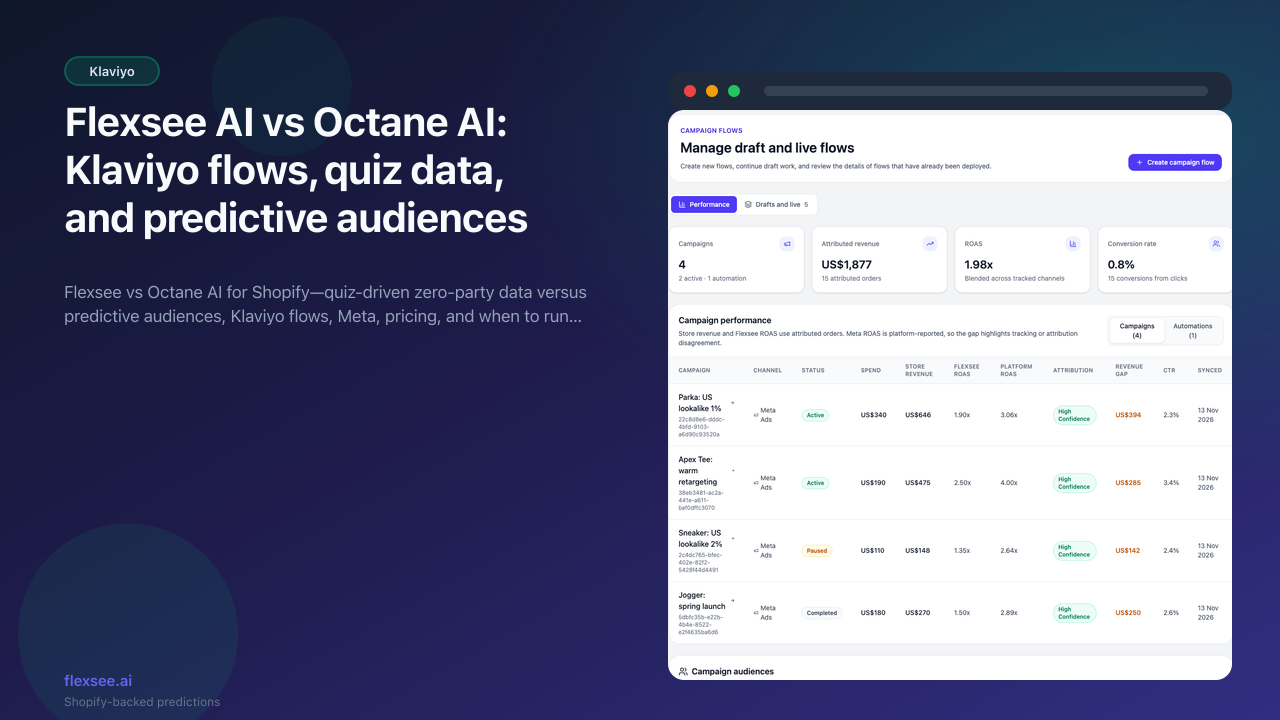
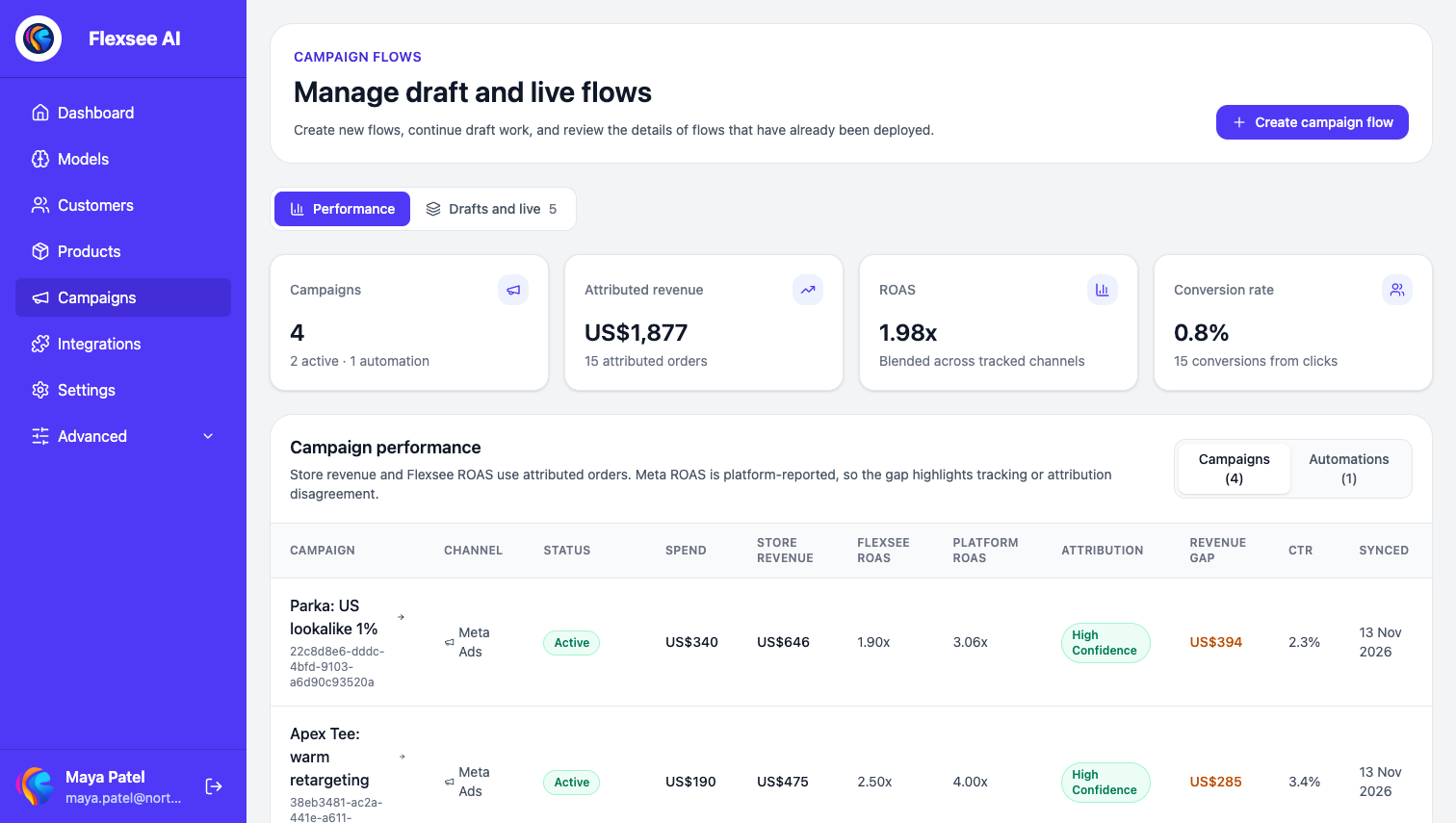
Flexsee puts Campaigns at the center. It shows attributed revenue, ROAS, and conversion rate across campaign flows, tied back to Shopify orders rather than only platform-reported numbers. In the campaign table, each Meta campaign shows Flexsee’s ROAS, built from attributed store orders, next to the ROAS Meta reports for the same campaign. The revenue gap column makes disagreements between the two easy to spot.
Octane reports on the quiz. Its listing highlights conversion rates, recommendation performance, funnel performance, and A/B testing, so you can see what each answer and each recommendation earns.
Honest gap: neither tool replaces a dedicated multi-touch attribution suite. Compare what you need to measure: quiz performance and per-answer revenue point toward Octane, while campaign-level return on Meta and email points toward Flexsee.
Pricing & total cost
The two products charge for different things, so a single “which is cheaper” answer would mislead.
Octane AI prices on credits. The pricing page says one credit is one quiz start, and AI features inside a quiz use additional credits, starting from 0.04 credits per use. Overage credits are billed at the end of the billing cycle at a rate that depends on your plan.
| Octane plan | Monthly price | Included |
|---|---|---|
| Basic | $50 ($43 a month billed yearly) | 400 credits, up to 2 quizzes, Octane logo shown |
| Plus | $200 ($170 a month billed yearly) | 2,200 credits, unlimited quizzes, A/B testing, custom CSS, logo hidden |
| Enterprise & Unlimited | From $500 ($425 a month billed yearly) | 7,250+ credits or unlimited, dedicated account manager |
The Shopify listing also shows larger credit bundles on the lower tiers: $100 a month for 900 credits on Basic and $350 a month for 4,500 on Plus. Each plan starts with a 14-day free trial, and Octane notes its charges may be billed separately from your Shopify invoice, in US dollars.
Flexsee AI prices per store, with each plan sized mainly by orders over the last 30 days. Plans also set product and customer limits. Every plan includes the full product: Campaign Flow, the embedded Shopify app, and the Meta Ads, Klaviyo, and Mailchimp destinations.
| Flexsee plan | Price per store | Orders in the last 30 days |
|---|---|---|
| Starter | £29 a month | Up to 50 |
| Growth | £99 a month | Up to 500 |
| Scale | £229 a month | Up to 3,000 |
Above Scale, Flexsee sets up a custom plan. Nothing is switched off when a store goes over a limit; Flexsee tells you, and if a store stays over for 7 days it pauses training on new data while existing predictions and campaigns keep working. Shopify stores are billed through Shopify. See plans and limits for the full table.
Cost note: Octane’s cost follows how many shoppers start your quiz. Flexsee’s follows the size of your store. A store with a very busy quiz and few orders and a store with many orders and no quiz would see these meters behave very differently, so price your own numbers.
Workflow comparison
Scenario A — Send a personalized Klaviyo campaign to likely buyers of one product
- With Flexsee: create a Klaviyo flow triggered by Flexsee Campaign Send, open Campaign Flow, pick the product and a predictive audience, choose that flow and a subject line, and activate. Consented recipients each get an event with ranked products.
- With Octane AI: Octane does not select shoppers by purchase likelihood. You would segment people who took the quiz, for example by a specific answer or by
recommended_productsin Klaviyo, and trigger a flow from that segment.
Verdict: Flexsee fits when the audience should come from store history. Octane fits when the audience is defined by what people told you.
Scenario B — Turn quiz answers into a welcome flow
- With Octane AI: connect Klaviyo, pick a list, and trigger a flow from the quiz-completed event, the list, a segment, or a date. The profile carries the answers and recommended products into the email.
- With Flexsee AI: Flexsee does not collect quiz answers, so there is nothing to build here. It becomes useful afterwards, when you want to send product campaigns to customers who are already consented.
Verdict: Octane wins this scenario outright.
Scenario C — Win back shoppers on Meta
- With Flexsee: choose Retargeting in Campaign Flow, let Flexsee prepare the custom audience from predicted high-intent buyers, and publish.
- With Octane AI: send quiz started and completed events to your pixel, then build an audience in Meta, for example people who started the quiz but did not finish.
Verdict: different inputs. Octane retargets by quiz engagement. Flexsee retargets by predicted purchase intent for a product.
Where Flexsee AI is stronger
- Prediction across your whole customer base. Flexsee ranks shoppers for a product from order and behavior history, so audiences are not limited to people who took a quiz (Campaign Flow docs).
- Activation in one flow. Meta audience preparation and publishing, Klaviyo, Mailchimp Transactional, Twilio SMS, and Quick Pay checkout are all destinations in Campaign Flow.
- Consent-aware Klaviyo sends. Events go only to recipients who already have email marketing consent, and Flexsee never subscribes anyone on its own (docs).
- Campaign-level reporting. Campaigns shows attributed revenue, ROAS, and conversion rate across flows (campaigns and attribution).
- One plan with everything included. Each store picks a tier by order volume, and every tier includes the full product.
Where Octane AI is stronger
- Zero-party data capture. Quizzes collect stated preferences and consent-based email and SMS opt-ins in one step (Shopify listing). Flexsee has no equivalent.
- Quiz-specific Klaviyo data. Answers, recommended products, results URLs, discount codes, and date properties sync to Klaviyo, with four flow trigger options (Klaviyo flows guide).
- Shopper-facing experience. Octane builds the quiz, pop-ups, and on-site customization your shoppers actually see, including a drag-and-drop editor and AI quiz builder. Flexsee ships no storefront UI.
- Experimentation and per-answer analytics. A/B testing is listed on the Plus plan, and the listing highlights funnel performance and recommendation performance.
- Track record and open platform. Octane has been on the Shopify App Store since March 2018 and shows a 4.7 rating from 210 reviews on its listing. Its listing also advertises an API, webhooks, and MCP access.
The Shopify listing includes an AI-generated summary of what merchants say, which highlights revenue lift, the Klaviyo integration, and responsive support. Treat it as a third-party summary of reviews, not a measurement.
Can you use both?
Yes, and for many stores that is the sensible answer, because the products complement each other.
- Octane AI captures preferences and consent, and creates Klaviyo profiles with quiz properties.
- Flexsee AI uses store history to pick which customers get a product campaign, and sends the structured
Flexsee Campaign Sendevent.
Keep three things in order:
- Separate flows. Octane’s flows trigger from quiz events, lists, segments, or dates. Flexsee’s flow triggers from the
Flexsee Campaign Sendmetric. Do not point both at the same flow. - Consent. Flexsee skips anyone without email marketing consent, and Klaviyo only emails profiles subscribed in Klaviyo. Octane’s opt-ins land in the Klaviyo list you choose, so check that quiz opt-ins and your existing list settings agree.
- Message frequency. Both tools can email the same person. Use Klaviyo’s own sending controls so a shopper does not get a quiz email and a product campaign on the same day.
There is no migration to plan, since neither product replaces the other.
Frequently asked questions
Is Flexsee a replacement for Octane AI?
No. Flexsee does not run quizzes, collect answers, or show anything on your storefront. If quizzes are central to how you learn about shoppers, keep Octane and consider Flexsee for predictive product campaigns on top.
Does Octane AI publish Meta campaigns?
We did not find campaign publishing or audience upload in Octane’s public documentation. Its Meta guide covers sending quiz started and quiz completed events to your pixel so you can build audiences and conversions in Meta yourself. Confirm with Octane if that has changed.
Does Octane AI work with Mailchimp?
Octane’s People page lists Shopify, Klaviyo, Attentive, and Postscript as sync targets, and its pricing page lists Klaviyo, Zapier, Alloy, Meta Pixel, Google Analytics, and Postscript. We did not find a native Mailchimp integration (checked 2026-11-13). Flexsee supports Mailchimp Transactional through Mandrill.
Which is cheaper?
It depends on your numbers. Octane charges on quiz starts and AI usage in credits, with overage billed at the end of the cycle. Flexsee charges per store by order volume. Price both against your own quiz traffic and order count.
Can Flexsee use Octane’s quiz answers?
Not directly. Quiz answers reach Klaviyo as profile properties, and you can use them there for segmentation. Flexsee’s predictions come from your store’s orders and behavior.
Methodology & updates
- Flexsee features verified: 2026-11-13 against the Flexsee docs (Campaign Flow, Klaviyo email campaign setup, plans and limits, Quick Pay) and the
flexsee-airepository, including the Klaviyo send service and the absence of any quiz feature in the dashboard. - Octane facts verified: 2026-11-13 from octaneai.com/pricing, the Shopify App Store listing, the People page, and the help center articles on connecting Klaviyo, Klaviyo segments and flows, the Meta Pixel, and Smart Products.
- Searches: we searched for Octane’s Klaviyo integration, pricing, Shopify reviews, and recommendation approach, and read the vendor pages above directly.
- A note on ratings: Octane’s homepage markup cites a 4.9 rating from 500 reviews, which is vendor-supplied. We cite the 4.7 from 210 reviews shown on the Shopify listing instead.
- What is not covered: we did not capture any Octane screens. All images are Flexsee’s own. The Customers, Audience, and Campaigns screens come from a seeded demo store (a fictional apparel shop), so the shoppers, orders, and ROAS figures are sample data, not customer results.
- Post last updated: 2026-11-13.
Trademarks belong to their respective owners. Features and pricing change, so confirm on each vendor’s site before you buy.
Comments